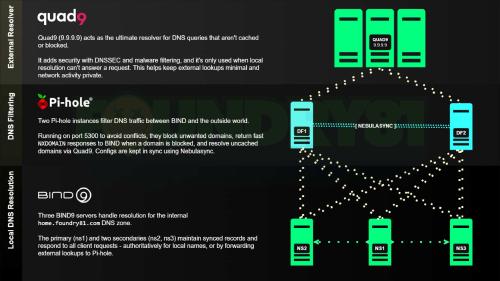
Back in March, I wrote about my DNS setup after rebuilding my BIND environment in Docker. It brought back a mix of solid lessons and a few painful ones - and I didn’t expect the flood of questions that followed.
Most of those questions traced back to the same issue: DNS was never set up intentionally.
This series is a structured brain dump of how DNS works, how it evolved, and how to run it properly in a Homelab.
While there are several great options for self-hosted DNS for your home network, this series is going to focus on the original workhorse: BIND. The how-to in this series will focus on BIND running in a Docker container, so if you have a piece of hardware capable of running Docker, you’ll be able to have a working DNS authoritative DNS system with recursive capabilities by the end.
The Benefits of Self-Hosted DNS
The basics work, but we can do better. To understand the advantages of running a DNS setup over a consumer router, you have to first understand what your router is probably doing.
In most home setups, the router isn’t a DNS server - it’s a forwarder. When you navigate to google.com, the router doesn’t know where that is; it simply passes the request along to your ISP’s DNS servers – or maybe Google or Cloudflare if you are able to change the default configuration. You’re outsourcing your network’s intelligence to your provider.
Running your own DNS server - whether as a recursive resolver, an authoritative server, or both - changes the architecture of your network.
Privacy and Data Sovereignty
When you use your ISP’s DNS, they see every domain you request. That data is valuable - and often monetized. In a typical router-based setup, your requests go from your machine to your router, and over to your ISP’s DNS servers, before hitting Root/TLS servers. The ISP logs everything.
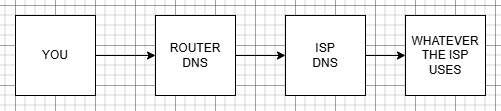
With a server like BIND in place, your request goes from your machine to BIND and hits the Root/TLS servers, if necessary. Running your own recursive resolver removes the ISP from that path. This doesn’t make you invisible - it just removes one observer. You communicate directly with the root and TLD servers, meaning your ISP no longer has a centralized log of your browsing habits at the DNS level.

Network Performance
While routers do some basic caching, a dedicated DNS setup is designed for high-performance memory management. Once BIND resolves a domain, i.e., netflix.com, it stores that result in its local cache for the duration of the record’s TTL (Time to Live.)
The next time any device in on your network requests that domain, BIND provides the answer instantly from RAM without ever leaving your network. In a network with multiple devices, this significantly reduces “first-click” latency. You can even before/after test this for yourself using my Curl output templates.
Local Domain Name Management (Internal Zones)
This is the biggest “quality of life” improvement for power users and Homelab enthusiasts. Consumer routers generally only allow you to assign a hostname to a device – BIND lets you create Internal Zones.
DNS turns a collection of machines into an environment.
Creating local domains such as .home or .lan (although I suggest using a subdomain of a registered Internet domain) changes things. IPs stop mattering as much, you gain structured naming, services become portable, and your environment becomes infinitely more understandable. Instead of having to remember 192.168.1.10:8006, you can simply navigate to proxmox.yourdomain.com.
Content Filtering
A consumer router is a black box - you get limited control over how it behaves. A professional DNS server gives you total control over the traffic. You can create a “blacklist” of domains – if you want to block a specific telemetry server that your smart TV uses to track usage habits, you can tell BIND to resolve that domain to 0.0.0.0 (nowhere.) Custom redirects allow you to redirect certain domains to internal mirrors or landing pages.
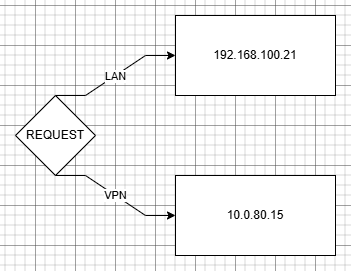
Split-horizon DNS lets the same domain resolve differently based on where the request comes from. For example, if a request comes from your internal network, a record can resolve to an internal IP; if it comes from a VPN connection, it can resolve to a different IP.
Improved Security and DNSSEC Validation
Many consumer routers ignore DNSSEC (DNS Security Extensions.) DNSSEC adds a digital signature to DNS records to prove that the record hasn’t been forged by an attacker – helping prevent DNS cache poisoning.
BIND can be configured to be a validating resolver. If a DNS response arrives without a valid cryptographic signature, BIND will reject it and refuse to send your computer to a potentially malicious website. Your router, by contrast, will usually blindly accept whatever the ISP sends it.
Here’s the difference in practice:
| Feature | Consumer Router | Professional DNS |
|---|---|---|
| Logic | “I’ll ask the ISP for you.” | “I’ll find the answer myself.” |
| Privacy | ISP logs every request. | Direct communication with root servers. |
| Local Names | Basic/Limited. | Full Internal Zones. |
| Speed | Dependent on ISP latency. | Instant local cache hits. |
| Security | Blind trust of upstream. | Strict DNSSEC validation. |
| Control | Toggle switches (on/off.) | Full configuration files and scripts. |
Creating a Solid Network Foundation
Having a well-structured DNS setup on your home network also provides a solid foundation for other commonly used services. Tools like NGINX Proxy Manager become easier to use, and trusted HTTPS via Let’s Encrypt becomes straightforward . If you’re using a subdomain of a registered Internet domain, internal SSL management becomes a simple task.
If you’re building or refining a Homelab, DNS is one of the highest-leverage systems you can understand. Just as a well-structured DNS setup provides a solid foundation for what’s built on top of it, having a solid foundational knowledge in DNS goes a long way in designing a successful setup. Let’s start with the origin and evolution of DNS.

Access Your Homelab from Anywhere.
You’ve now seen what a structured DNS setup actually gives you - consistency, flexibility, and something you can rely on.
The next step is making those services accessible without turning your network inside out. That’s where Twingate fits in - take a look at how it securely extends what you're building past the boundaries of your Homelab.
All posts in this series:
- DNS in the Homelab
- The Origin and Evolution of DNS, the Domain Name System
- Who Manages DNS for the Internet?
- DNSSEC and DNS’ Fundamental Flaw
- The Anatomy of DNS Zones: Roles and Functions
- Understanding DNS Records
- Designing Your Homelab DNS
- Homelab DNS: Running BIND with Docker
- DNS and HTTPS in the Homelab: Moving Beyond IP Addresses
- Homelab DNS Troubleshooting
Contents
Tags
Recent Posts
-
observation
 9/11: 25 Years Later
-
self-hosting
 Bumping Integrated GPU Memory Limits
-
self-hosting
 Containerized ComfyUI with ROCm 10 on the Minisforum N5 Pro Running TrueNAS
-
observation
 Under Our Own Power
-
infrastructure
 What Does “Zero Trust” Actually Mean?
-
What Happens When a CVE Becomes a KEV?
-
The Language We Inherit From Machines
-
DNS Decisions: Recursive, Authoritative, and Forwarding Explained
-
The Real Watermark is You
-
I Like My Web Servers Basic AF