To understand the Domain Name System, you need to first understand that computers are fundamentally incapable of understanding “names.”
They understand numbers – specifically the binary representations of IP addresses. DNS exists to bridge that gap, allowing humans to interact with the Internet using language instead of raw addressing.
The Pre-DNS Era: The Age of HOSTS.TXT
Before DNS existed in the early 1980s, the Internet (then known as ARPANET) was a small, tight-knit community of researchers, military personnel, and academics. There were only a few hundred computers on the network and the method for mapping names to addresses was a simple HOSTS file.
There was single, centralized file called HOSTS.TXT. It contained a list of every single computer connected to the network and its corresponding address.
Most modern operating systems, probably the one you’re using right now, still use a HOSTS.TXT file and it can be defined to use hostnames and domain names by the system. If you’re on a Windows machine, look for \System32\drivers\etc\hosts on your system drive. If you’re running Linux or macOS, you’ll find it at /etc/hosts.
Here’s what the one on my Windows desktop I’m using today looks like:
|
|
There’s not a whole lot going on with it, but it’s enough to help make sense of what we’re talking about.
If you wanted to connect to a computer at Stanford, your machine needed a copy of the master list. Getting the latest version meant using FTP to download the HOSTS.TXT file from a central server managed by the Stanford Research Institute (SRI).
This worked – right up until the network started growing:
Scaling Problem: The file grew too large to be downloaded by every single machine every time a new computer joined the network.
Centralized Bottleneck: Every person who wanted a new “name” had to email the administrators at SRI and wait for them to update the master file.
Inconsistent State: Because updates weren’t instantaneous, different computers had different versions of the HOSTS.txt file, leading to “address not found” errors.
DNS Solves the Problem
1983 was a big year. Return of the Jedi hit theatres, Motorola’s first commercial mobile phone was released, and ARPANET reached a tipping point. The need for a distributed, scalable, and decentralized system became urgent.
The key architect of DNS was Paul Mockapetris, a researcher at the University of Southern California’s Information Sciences Institute. He authored the original specifications for DNS in RFC 882 and RFC 883 – they were later superseded by RFC 1034 and 1035.
Mockapetris didn’t just create a “phonebook,” he created a hierarchical database where instead of having one master list, there was a system where the responsibility could be delegated.
Hierarchy and The Process
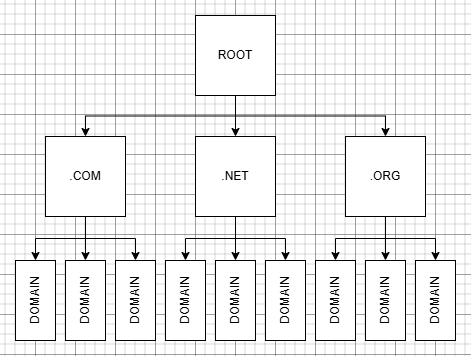
DNS is structured like an inverted tree:
The Root Zone is at the top of the hierarchy. Root servers don’t know where foundry81.com is, but they know who manages the .com extension.
Top-Level Domain (TLD) Servers manage suffixes like .com, .net, .org, and country codes like .uk or .jp.
Authoritative Name Servers are the final stop. These are owned by the entity (or hosting company – Digital Ocean in my case) and hold the actual IP address for the specific domain.
When you type foundry81.om into your browser’s address bar and press enter, your computer asks a recursive resolver and the resolution process looks like this:
- Root Server: Where is .com? and gets a “Go ask the TLD server at this IP.”
- TLD Server: Where is foundry81.com? and gets “Go ask the authoritative server at this IP.”
- Authoritative Server: What is the IP for foundry81.com? and gets “107.170.93.99”
DNS Made the Internet Usable - and Scalable
DNS began as a simple mapping tool and, over time, evolved into the “control plane” of the Internet.
The service grew to do more than just provide IP addresses (A records.) MX records, telling the world where to send email, CNAMEs alias one name to another, and TXT records are used for a variety of reasons including security and ownership verification.
To prevent Root Servers from being overloaded by requests, “Anycast” was implemented. This allows multiple physical servers around the world to share the same IP address – the network simply routes your request to the geographically closest one.
The original iteration of DNS was unencrypted and unauthenticated, making attacks like DNS spoofing possible. To combat this, DNS Security Extensions (DNSSEC) were introduced to digitally sign DNS data, ensuring it hasn’t been tampered with.
In an Alternate Timeline…
If DNS have never been invented and we tried to scale the HOSTS.TXT method, or simply relied on IPs, the Internet of 2026 would be unrecognizable. DNS made the Internet usable by introducing abstraction – humans use names while networks use IP addresses, and DNS connects the two.
Without DNS, modern infrastructure simply wouldn’t function.
The internet would likely be a series of “walled gardens.” You wouldn’t “browse” the web; you would likely use a proprietary directory app (like a digital Yellow Pages) provided by your OS that maps to IPs internally.
Modern websites don’t reside on a single machine; they often live on as many as thousands via CDNs. When you visit a site, DNS dynamically routes you to the server closest to you. Without DNS there’s no dynamic routing. You’d be hard-coded to a specific server, so if that one was down the site would be dead for you – even if a server in another region was perfectly healthy.
Current networking relies on Dynamic IP addresses – your home router’s IP changes regularly (unless you pay for a static one,) and DNS allows a service to maintain one name while the underlying IP changes. Without DNS, every single device on the internet would require a static IP and this would have exhausted the IPv4 address space decades ago – and made the transition to IPv6 an absolute nightmare, as every single configuration file on every server globally would need to be manually updated every time a new server moved.
DNS is the invisible glue of the digital age. While we perceive it as a simple “translator,” it’s really the mechanism that allowed the internet to scale from a handful of researchers to a global utility. Without it, the Internet would not be a “web” of interconnected sites, but a rigid, fragile collection of numbered silos.
Understanding where DNS came from makes it much easier to understand how to use it properly; understanding how it’s managed at the scale of the Internet before designing a DNS structure for your Homelab makes the process more rewarding – so let’s move on to that next.

Access Your Homelab from Anywhere.
DNS didn’t become what it is today by accident - it evolved to support scale and distributed access.
That same idea shows up quickly once you start accessing your own services from outside your network. Tools like Twingate build on that foundation - see how that looks in practice.
All posts in this series:
- DNS in the Homelab
- The Origin and Evolution of DNS, the Domain Name System
- Who Manages DNS for the Internet?
- DNSSEC and DNS’ Fundamental Flaw
- The Anatomy of DNS Zones: Roles and Functions
- Understanding DNS Records
- Designing Your Homelab DNS
- Homelab DNS: Running BIND with Docker
- DNS and HTTPS in the Homelab: Moving Beyond IP Addresses
- Homelab DNS Troubleshooting
Contents
Tags
Recent Posts
-
observation
 9/11: 25 Years Later
-
self-hosting
 Bumping Integrated GPU Memory Limits
-
self-hosting
 Containerized ComfyUI with ROCm 10 on the Minisforum N5 Pro Running TrueNAS
-
observation
 Under Our Own Power
-
infrastructure
 What Does “Zero Trust” Actually Mean?
-
What Happens When a CVE Becomes a KEV?
-
The Language We Inherit From Machines
-
DNS Decisions: Recursive, Authoritative, and Forwarding Explained
-
The Real Watermark is You
-
I Like My Web Servers Basic AF