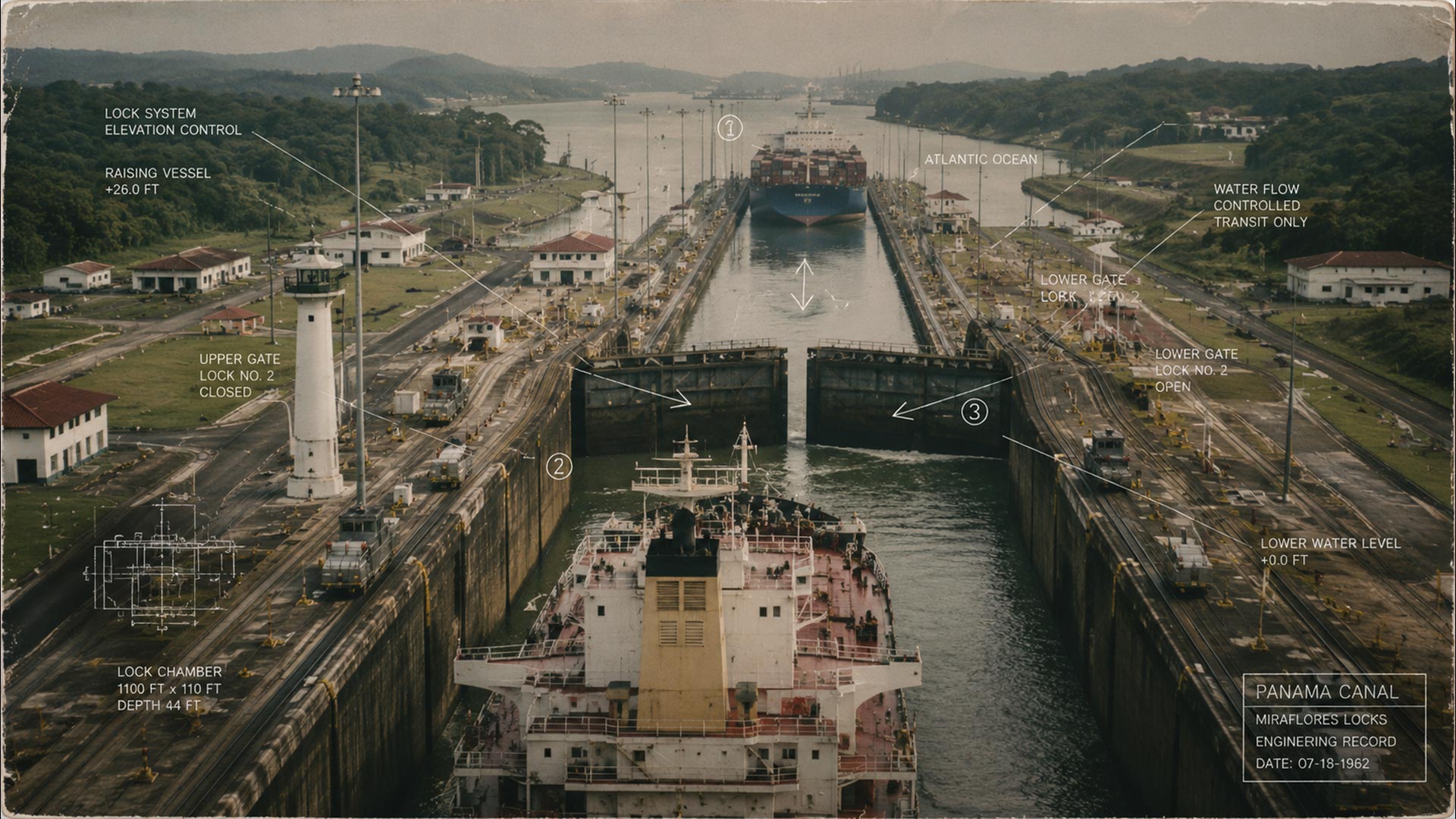
The Panama Canal is one of those pieces of infrastructure that’s easy to take for granted until you stop and think about what it’s actually doing.
It connects the Atlantic and Pacific Oceans, saving ships from making the much longer trip around the southern tip of South America. Ships don’t just enter one end and sail out the other; the canal uses locks and gates to move vessels between different water elevations and control their passage through the system.
The gates aren’t there because the canal doesn’t trust ships. They’re there because uncontrolled movement through the system would be a big problem. That makes the Panama Canal a surprisingly good way to explain Zero Trust Network Access.
I get asked about Zero Trust fairly often because of my association with Twingate. Being their Education and Strategy Partner comes with questions, and I’ve found that the term itself is usually where the confusion starts.
What exactly does it mean?
That’s a surprisingly difficult question to answer, mostly because “Zero Trust” has been stretched so far that it can mean almost anything depending on who’s using it. A product can be Zero Trust, so can a network or application. If you put the words on a conference booth and the font is large enough, the booth itself can probably be Zero Trust too.
Zero Trust Greek Yogurt? Does it have AI? What, did you think those were real strawberry pieces?
If we strip away the marketing language, what does Zero Trust actually change?
Zero Trust isn’t a product
Let’s get this out of the way first. Zero Trust isn’t a product you buy. It isn’t a VPN replacement, a firewall, an identity provider, or an appliance you install in the server room before proudly checking off a box on a security questionnaire.
Zero Trust is an approach to access.
The simplest way I know to explain it is that traditional network security often starts with a question like:
Are you inside the network?
If the answer is yes, you’ve already crossed a pretty significant trust boundary.
Zero Trust starts somewhere else:
Are you authorized to access this particular resource?
It’s a subtle change in wording with a significant change in architecture.
Think about the canal
A ship traveling through the Panama Canal doesn’t need access to everything in Panama.It needs a controlled route through a specific system to reach its destination. The canal doesn’t accomplish that by building a giant wall across the water and declaring victory. It uses channels, locks, gates, operators, procedures, and a lot of infrastructure to control how movement happens.
A ship can move. Water can flow. But neither is given unrestricted movement simply because it has entered the system.
That’s a useful way to think about ZTNA. A user doesn’t necessarily need access to a network. They need access to a particular application, server, service, or other resource.
The question changes from:
How do I get this person onto the network?
to:
What does this person actually need access to?
That’s a much better question.
The network isn’t the authorization
This is where my obsession with remote access comes into play. For a long time, the standard answer to remote access was straightforward: establish a VPN connection and put the user on the network.
There’s nothing inherently wrong with that. VPNs are useful technology. They encrypt traffic, provide connectivity, and can be an entirely reasonable part of a secure architecture; the problem is what happens after the connection is established.
If connecting the VPN effectively means “you’re now on the inside,” we’ve made network location a significant part of the authorization decision. That’s a pretty broad trust decision. A user might need access to one application, one server, or one service. Giving them access to an entire network because that’s how the remote-access technology works is a very different proposition. This is one of the things I find most useful about thinking in Zero Trust terms. Instead of asking how to connect someone to the network, I can ask what they actually need to reach.
The canal doesn’t give a ship unrestricted access to every waterway just because it has entered the canal. Neither should a remote-access system give a user unrestricted access to every network resource simply because they’ve authenticated.
So what does Zero Trust actually require?
There isn’t a single magic checklist that turns an environment into Zero Trust, but there are some pretty straightforward principles.
Authenticate
First, you need to know who - or what - is making the request.
That’s more useful than simply knowing where the connection originated. An IP address isn’t an identity. Neither is being connected to the office Wi-Fi or via a VPN. Authentication establishes who is making the request.
Authorize
Authentication answers:
Who are you?
Authorization answers:
What are you allowed to access?
Those are two completely different questions.
A user can be successfully authenticated and still not be authorized to access a particular application or server. This sounds obvious, but a surprising amount of traditional network access architecture effectively combines the two.
Limit access
If someone needs access to one application, give them access to one application. If they need access to one server, give them access to that server. Don’t automatically give them access to an entire network simply because that’s the easiest way to provide connectivity.
This is where least privilege becomes particularly relevant. We want to make unnecessary access impossible without making all access impossible.
Don’t trust the network just because it’s the network
This is probably the most important conceptual shift.
A device on the corporate LAN isn’t automatically trustworthy. A device connected through a VPN, or even one sitting in the same building as a server, isn’t automatically trustworthy. A compromised machine doesn’t become safe simply because it happens to have an internal IP address.
Network location can still be useful information, but it shouldn’t automatically be the thing that grants access.
Evaluate continuously and log
Access decisions should be based on useful information, and those decisions should be observable. Identity, device information, resource, policy, and other contextual information can contribute to determining whether access should be allowed. And that decision doesn’t necessarily need to be treated as permanent.
You authenticated successfully at 9:00 AM. That doesn’t mean every access request you make at 4:00 PM should automatically receive the same decision. When access is granted, you should also have enough logging to understand what happened.
None of this requires interrogating a user every thirty seconds because the security architecture has developed trust issues. It means making better access decisions with the information you actually have.
Is Zero Trust really “zero trust”?
Not really, and that’s probably the worst part of the name.
Nobody actually trusts nothing. You still have to trust your identity provider, the systems making authorization decisions, cryptographic credentials, policies, and configurations.
The goal isn’t to literally eliminate trust. It’s to stop granting trust simply because something happens to be in the right place. I think that’s a much more useful definition - and it’s another reason I like the canal analogy.
The canal doesn’t need to distrust every ship. It needs a system for deciding which ships can move through which parts of the canal and under what conditions.
Where ZTNA fits
Zero Trust is much broader than remote access. The same principles can apply to applications, data, workloads, services, and other resources. Remote access is simply one of the easiest places to see the difference between a traditional trust model and a Zero Trust approach.
That’s what Zero Trust Network Access, or ZTNA, is getting at. Instead of treating network connectivity as the end goal, ZTNA focuses on providing controlled access to specific resources.
A user doesn’t need to be “inside.” They need to be authorized for the thing they’re trying to reach.
Think back to the canal. A ship isn’t granted unrestricted use of the entire waterway system simply because it’s been approved for transit. Its movement is controlled through a sequence of channels, gates, locks, and decisions that get it where it needs to go.
The canal doesn’t prevent movement. It controls movement, and that’s a much better mental model for ZTNA than “a more secure VPN.”
This is where Twingate gets interesting
Because of my work with Twingate, people understandably expect me to tell them that Twingate is Zero Trust.
The easy answer is yes, but that’s not a terribly helpful answer.
Twingate is one way of implementing an access architecture based on many of the principles we’re talking about. It can provide access to specific resources rather than simply dropping someone onto a network.
==TWINGATE VIDEO HERE==
Despite this, Twingate isn’t the definition of Zero Trust. Buying Twingate doesn’t automatically make an organization Zero Trust any more than buying a firewall makes an organization secure. Architecture, policies, identity, and the resources you’re actually granting access to still matter.
That’s important because I don’t think Zero Trust should be reduced to a product category. It’s much more important than that.
Zero Trust is an architecture problem
This is also why I don’t think the first question should be:
Which Zero Trust product should I buy?
The better question is:
What trust assumptions exist in my current architecture?
Maybe you assume that everyone on the LAN is trustworthy. Maybe you give a contractor access to an entire network because that’s easier than giving them access to the two systems they actually need. Hopefully there isn’t a compromised workstation with network access to things it has absolutely no business talking to.
Those are architectural decisions. A Zero Trust approach challenges them - and this is where the concept becomes useful instead of becoming another security buzzword.
Remote access is a great place to start
I’ve spent a lot of time thinking about remote access, and I don’t think there’s a single perfect architecture for every organization.
There are legacy applications, weird protocols, and systems that were designed in 2007 that haven’t been touched since. Clients with requirements that make a textbook architecture impractical are as common as me getting a meatball parm on a Tuesday. It’s reality.
Zero Trust doesn’t require pretending those things don’t exist. It gives us a better set of questions to ask about them. Instead of asking how to connect someone to the network, we can ask what they actually need to reach. Trusting a device because it’s on the right network is replaced by considering the identity, device, resource, and policy involved in the request.
None of these ideas are revolutionary. But put them together, and they represent a pretty significant change in how we think about access.
So, what does Zero Trust actually mean?
For me, it comes down to one question:
What trust assumption did we remove?
Did we stop assuming that being on the LAN means someone should be able to access an application?
Did we stop giving users access to an entire network when they only need one service?
Did we make authorization dependent on identity and policy instead of network location?
Most importantly, did we reduce the ability of a compromised account or device to move laterally? If the answer is yes, we’re doing Zero Trust things. We don’t necessarily need to call it Zero Trust, and we certainly don’t need to buy a product because it has those words in the marketing material. We don’t need to pretend that “zero trust” means literally trusting nothing, either.
The Panama Canal doesn’t stop ships from moving; it gives them a controlled path through a complicated system. Zero Trust doesn’t stop people from accessing resources. It gives them a controlled path to the resources they’re actually authorized to use.
I’ve spent years obsessing over remote access because getting someone connected is the easy part. Getting them connected to exactly what they need - and nothing else - is the interesting part.
I also just inadvertently explained why Twingate is named Twingate, so hey, I’m going to treat myself to a meatball parm on Friday.
Contents
Tags
Recent Posts
-
observation
 9/11: 25 Years Later
-
self-hosting
 Bumping Integrated GPU Memory Limits
-
self-hosting
 Containerized ComfyUI with ROCm 10 on the Minisforum N5 Pro Running TrueNAS
-
observation
 Under Our Own Power
-
infrastructure
 What Does “Zero Trust” Actually Mean?
-
What Happens When a CVE Becomes a KEV?
-
The Language We Inherit From Machines
-
DNS Decisions: Recursive, Authoritative, and Forwarding Explained
-
The Real Watermark is You
-
I Like My Web Servers Basic AF