DNS is one of those things that starts simple and becomes complicated as a result of success.
A Homelab might begin with a router handing out an address for a DNS server, then come a few internal hostnames. Maybe at some point Pi-hole gets added, then a VPN, and some containers followed by a second VLAN. Eventually, someone asks why a local service works from one machine, but not another.
At this point, you’re going well beyond just configuring DNS and making DNS architecture decisions. Those decisions don’t change all that much as an environment grows. What does change is the number of systems, users, domains, locations, dependencies, and things that can go wrong.
The same fundamental concepts that matter in a Homelab also matter in an office, across an MSP’s client base, and on the public Internet. The only real difference is how much you have to manage.
Decisions, not Defaults
Most DNS configurations are inherited by past teams or employees. Your router provides DNS and your DHCP server tells clients to use it. Someone adds 8.8.8.8 because “Google DNS works.” A VPN client installs another resolver (now we’re entering twitching eye territory) and a container platform creates its own resolution layer.
Eventually, something stops resolving and the instinct is often to add another resolver. While that may solve the problem, chances are that it isn’t solving the architectural issues that caused the problem in the first place. Instead of rushing to a solution, ask yourself:
What problem am I actually trying to solve, and which DNS function should be responsible for solving it?
Asking that often helps since DNS servers can perform different roles, and the roles can exist together.
The Three Amigos of DNS
DNS has three roles that show up again and again: recursive, authoritative, and forwarding. They aren’t mutually exclusive, and they aren’t necessarily three different servers - but if you’re trying to understand what each actually does, it helps to think of them as three characters:
Recursive DNS - Lucky Day:
“I’ll find it.”
Authoritative DNS - Ned Nederlander:
“I know it.”
Forwarding DNS - Dusty Bottoms:
“You find it.”
Hold on Matt, did you just use The Three Amigos for a DNS analogy? Yeah, I did. Watch the movie and you’ll see it works pretty well.
Recursive Resolution
A recursive resolver is responsible for finding an answer it doesn’t already know.
If a client asks for www.example.com, the resolver can work through the DNS hierarchy - from the root, to the .com servers, to the authoritative servers for example.com - and return the answer.
A recursive resolver can also cache results, validate DNSSEC, and provide local answers for zones it has been configured to understand. The important question isn’t whether recursion is “better” than other options, but whether you want to own the resolution process.
Authoritative DNS
An authoritative server answers questions about zones it controls. If a server is authoritative for example.com, it knows the records for that zone. It doesn’t need to go looking elsewhere for the answer. That makes authoritative DNS fundamentally different from recursion.
An authoritative server is saying:
I know this zone.
It isn’t saying:
I’ll find whatever you ask me.
This distinction becomes particularly important for public DNS. Your authoritative servers should answer for the domains they’re responsible for without becoming an open recursive resolver for everyone else’s queries. Authoritative DNS is also useful internally. You might have a private zone containing names that should only exist inside your network, like my home.foundry81.com zone - accessible only when on my network.
Forwarding
A forwarder doesn’t necessarily find the answer itself. Instead, it sends the query to another resolver.
Forwarding isn’t inherently bad or less sophisticated - it’s a deliberate dependency. If you forward queries to another resolver, you’ve decided that the upstream resolver will handle some portion of the work. That can be exactly what you want, but can also become a problem if you haven’t thought about what happens when that dependency fails.
Start With the Question, Not the Software
Before choosing BIND, Unbound, Pi-hole, AdGuard, or anything else, start with the questions your DNS infrastructure needs to answer.
Do you need to resolve public Internet names? If not, you may only need authoritative DNS for internal zones.
Do you need to resolve names you don’t control? If so, something needs to perform recursive resolution - or you need to trust another resolver to do it.
Do you need different answers depending on where the query originates? That’s where split-horizon DNS, views, or another mechanism for separating internal and external answers enters the picture.
Do you trust an upstream resolver to handle recursion for you? If yes, forwarding may be perfectly reasonable.
Do you need to publish DNS for domains other people use? Now you’re dealing with authoritative public DNS, delegation, redundancy, DNSSEC, and the operational requirements that come with being part of the public Internet.
The architecture follows from those requirements and the software comes afterward.
The Decision Tree
The exact implementation will vary, but the basic thought process looks something like this:
  %%{init: {
  'theme': 'base',
  'themeVariables': {
    'primaryColor': '#dbe247',
    'primaryTextColor': '#222222',
    'primaryBorderColor': '#222222',
    'lineColor': '#222222',
    'secondaryColor': '#dbe247',
    'tertiaryColor': '#dbe247'
  }
}}%%
flowchart TD
    START[What does DNS need to do?] --> Q1{Do I control the names<br/>being queried?}

    Q1 -->|Yes| AUTH[Authoritative DNS<br/>for local or public zones]
    Q1 -->|No| Q2{Do I need to resolve<br/>public Internet names?}

    Q2 -->|No| AUTH
    Q2 -->|Yes| Q3{Do I want to own<br/>recursive resolution?}

    Q3 -->|Yes| REC[Recursive Resolver<br/>with local zones as needed]
    Q3 -->|No| FWD[Forward to a resolver<br/>I trust]

    AUTH --> Q4{Do internal and external<br/>clients need different answers?}
    Q4 -->|Yes| VIEWS[Views / Split Horizon<br/>or separate DNS paths]
    Q4 -->|No| SIMPLE[Keep the architecture simple]

    REC --> Q5{Do I need local<br/>authoritative zones?}
    Q5 -->|Yes| LOCAL[Recursive + Local Zones]
    Q5 -->|No| INTERNET[Recursive Internet Resolution]

    FWD --> UPSTREAM[Upstream Resolver<br/>becomes a dependency]
No matter where you land while working through the diagram, the most important part is recognizing that these functions can coexist.
A BIND Docker container, for example, doesn’t have to fit neatly into one box. It can provide authoritative service for zones you control while also providing recursive resolution for clients, assuming you’ve configured and secured those functions appropriately. Function comes before mode.
Same Problem, Different Scales
This becomes easier to understand when you look at how DNS changes as the environment grows.
The Homelab
A small Homelab might have a few dozen services, some containers, a VPN, and a handful of internal names. You might choose a local resolver that provides filtering and forwards Internet queries elsewhere and that’s a reasonable design. You have limited infrastructure, limited administrative overhead, and probably limited consequences if DNS is unavailable for a few minutes. The architecture can be simple because the problem is simple - but even here, it’s worth knowing what happens when the resolver disappears.
The Small Office
Now imagine a business with several VLANs, printers, servers, phones, guest devices, and remote workers.
DNS is no longer just a convenience - it’s part of how the network operates and if you’re running Active Directory it’s an absolute dependency. Internal names may need to resolve differently from public names. Different networks may need different answers. VPN clients may need access to internal services. DHCP needs to point clients at the correct resolvers.
At this point, “the router handles DNS” may still work, but needs to be an intentional decision rather than an assumption.
The Managed Service Provider
Now multiply that environment by dozens or hundreds of clients. This is where another DNS problem appears: management. The technical DNS architecture hasn’t changed much, but the operational problem has. An MSP may be dealing with different registrars, different DNS providers, client requirements, and decision makers.
At this point, knowing how DNS works isn’t enough. You need a way to manage it consistently.
This is where dedicated DNS management platforms become useful. Unified DNS (uDNS), for example, is designed specifically around the MSP problem: managing client DNS across multiple providers from a centralized system, with capabilities such as backups, audit logging, client organization, and email-security visibility.
That’s not an endorsement of one particular product, but it is a great example of what happens when DNS stops being an individual configuration problem and becomes an operational management problem. At this point, “Where is this DNS record?” becomes a much more interesting question than it was in the Homelab.
The Public Internet
At the other end of the spectrum, you’re dealing with authoritative DNS for domains that the entire Internet may need to resolve. At this point, redundancy and delegation matter much more than before. DNSSEC becomes critical, and so do geographic distribution and monitoring. Mistakes have consequences that extend well beyond your own network.
While the underlying concepts haven’t changed, you’ve reached the point where reliability, security, and operational discipline matter a lot more - and that’s the useful lesson in scaling DNS.
The concepts remain surprisingly stable while responsibility grows.
Where DNS Designs Go Wrong
The problems tend to appear when the architecture wasn’t actually designed.
Forwarding Loops (Brøther I do not want them.)
One resolver forwards to another, the second resolver forwards back to the first, and you’ve built a DNS merry-go-round. This is particularly easy to create when combining local filtering, recursive resolvers, VPN DNS, and application-specific DNS configuration. Know which system is actually responsible for recursion and keep good documentation.
Search Domains
A search domain can make short names convenient:
|
|
becomes:
|
|
It also changes what happens to queries that aren’t actually local. If your resolver forwards these queries upstream, you need to understand what information is leaving your network and where it’s going. Convenience always has a cost.
Split Horizon
Split-horizon DNS is useful when internal clients need one answer and external clients need another. It is also a great way to create confusion if nobody knows which resolver a client is actually using.
VPNs make this even more interesting, along with overlay networks such as Tailscale, which can provide their own DNS behavior. Twingate, on the other hand, can work with your existing DNS configuration rather than requiring you to replace it with its own DNS architecture.
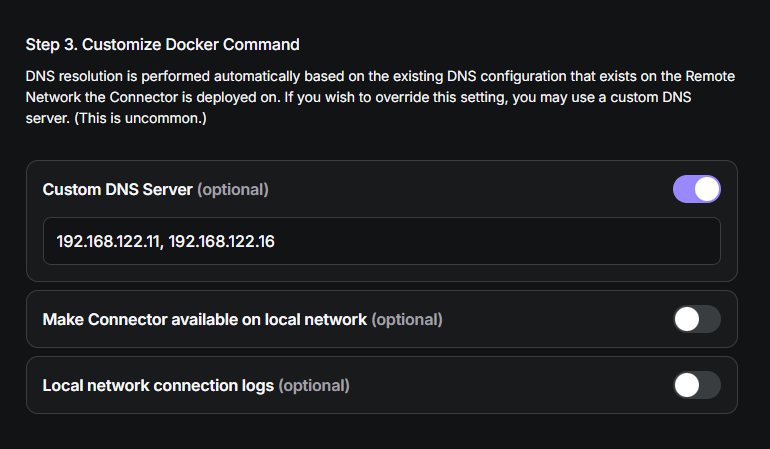
I went on a bit of a tangent here, but this is a feature of Twingate that got me interested in the first place and worth noting if you’re as obsessive about DNS as I am.
If something already provides the split-horizon behavior you need, adding another DNS layer simply because “that’s how we normally do it” may create more problems than it solves.
Container DNS
Containers often don’t interact with DNS in quite the same way that a normal workstation does. Docker, for example, commonly provides an embedded DNS server to containers. That means your carefully designed host resolver may not be the thing actually answering a container’s DNS queries.
When troubleshooting DNS, always establish which resolver actually received the query before deciding that the resolver itself is broken.
Architecture Should Explain the Failure
Useful DNS design is less about having the most features and more about being able to explain what happens when something goes wrong. Ask:
- What happens if the local resolver goes down?
- What happens if the upstream resolver is unavailable?
- What happens if the Internet is unavailable?
- What happens if an internal authoritative server is unavailable?
- What happens to VPN clients?
- What happens to containers?
- What happens when a public DNS provider has an outage?
- Who knows how to change the configuration?
- Can you restore the previous configuration quickly?
Those questions are more useful than asking whether your DNS server is “enterprise.” Your DNS architecture is a liability ledger - every additional component introduces potential points of failure, while each upstream resolver you trust becomes another dependency and each special-case configuration introduces something that needs to be understood later.
While this is beginning to sound like a KISS scenario, it really means you just need to know why the complexity exists.
So, What Should You Do?
Start with what DNS needs to accomplish, not with the software.
Determine which zones you control, whether you need recursive resolution, and whether you want to perform recursion yourself or trust another resolver. Determine whether internal and external clients need different answers, and then decide where those functions belong.
In a Homelab, that might mean one or more BIND servers doing several jobs. In a business, it might mean separating authoritative and recursive services. At an MSP, it might also mean introducing a management layer so DNS across many customers can be monitored, backed up, audited, and changed consistently.
On the public Internet, it means operating authoritative infrastructure with the redundancy and discipline that public-facing services require.
None of those designs are automatically correct, because the right design is found in the one you can explain. If you can’t draw your DNS structure on a napkin, you probably have a collection of defaults that happen to work - for now.
Go Deeper
Oh hey - look at that! A handy set of links! Seriously though, I went ham on DNS a few months ago and if you’re looking for more information on the service, these are a great place to start:
- History & architecture: Origin and Evolution of DNS · Who Manages DNS for the Internet?
- DNS infrastructure: Anatomy of DNS Zones · Understanding DNS Records · DNSSEC and DNS’ Fundamental Flaw
- Homelab: DNS in the Homelab · Designing Your Homelab DNS · Running Your Own DNS Server · BIND with Docker
- Operations: Homelab DNS Troubleshooting · DNS and HTTPS in the Homelab
Contents
Tags
Recent Posts
-
observation
 9/11: 25 Years Later
-
self-hosting
 Bumping Integrated GPU Memory Limits
-
self-hosting
 Containerized ComfyUI with ROCm 10 on the Minisforum N5 Pro Running TrueNAS
-
observation
 Under Our Own Power
-
infrastructure
 What Does “Zero Trust” Actually Mean?
-
What Happens When a CVE Becomes a KEV?
-
The Language We Inherit From Machines
-
DNS Decisions: Recursive, Authoritative, and Forwarding Explained
-
The Real Watermark is You
-
I Like My Web Servers Basic AF